Can ChatGPT Make a PowerPoint? Yes, in 5 Ways
Yes. ChatGPT makes PowerPoint slides with a free add-in, .pptx files and its Slides editor. Each way, the plan it needs, and when another tool is better.
By Leo Hußke8 min read
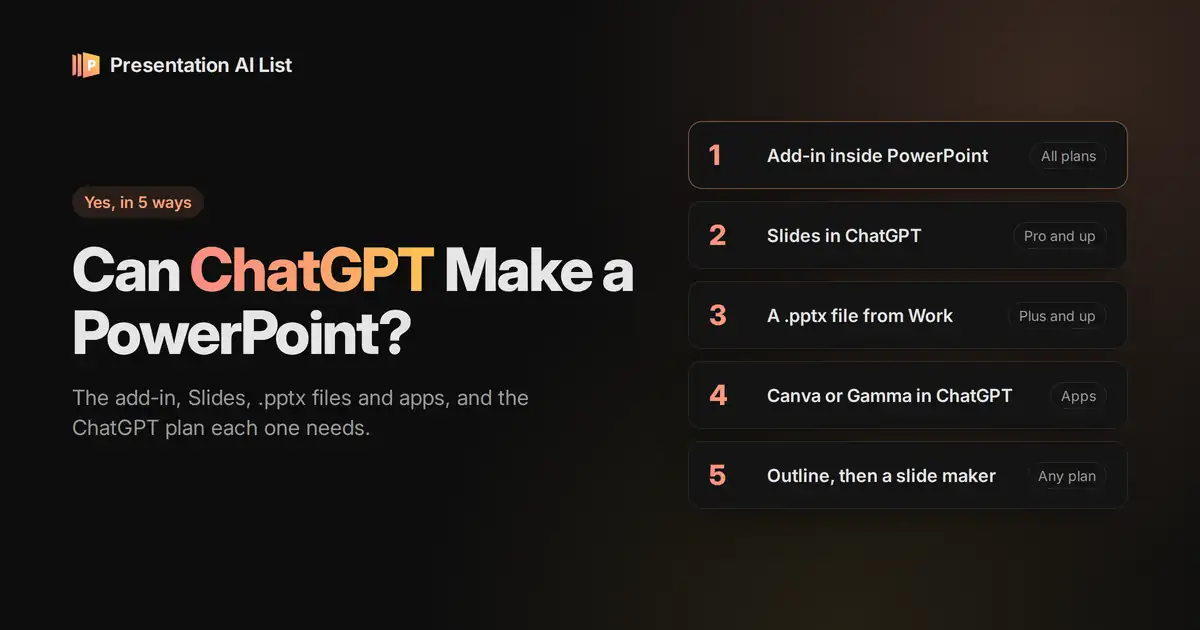
Yes, ChatGPT can make a PowerPoint, and there are five ways to do it today. The quickest is OpenAI's ChatGPT for PowerPoint add-in. It builds editable slides inside PowerPoint and works on every ChatGPT plan, the free one included. ChatGPT can also create a .pptx file for you to download, or build a deck in its own Slides editor and export it to PowerPoint. This guide covers each way, the plan it needs, what the slides look like, and when a dedicated AI presentation maker gives you a better deck.
Five ways ChatGPT makes a PowerPoint
| Way | Where you work | ChatGPT plans | What you get |
|---|---|---|---|
| ChatGPT for PowerPoint | In PowerPoint | All plans, limited on Free and Go | Editable slides in your own deck |
| Slides in ChatGPT | In ChatGPT | Pro, Business and Enterprise | A deck you export to PowerPoint, PDF or Google Slides |
| A .pptx file from ChatGPT Work | In ChatGPT | Plus and up on the web, Free and Go in the desktop app with limits | A .pptx file to download |
| Canva or Gamma inside ChatGPT | In ChatGPT, then in Canva or Gamma | Depends on your plan and workspace | A designed deck in Canva or Gamma |
| An outline pasted into an AI presentation maker | In ChatGPT, then in another tool | All plans | A designed deck from the other tool |
If you already have PowerPoint, start with the add-in. If you want the best-looking deck for the least work, use ChatGPT for the outline and a dedicated presentation maker for the slides.
1. Use the ChatGPT add-in inside PowerPoint
OpenAI's ChatGPT for PowerPoint add-in opens as a sidebar in PowerPoint. It drafts a deck from your notes, documents or spreadsheets. It adds or rewrites slides in a deck you already have, and it answers questions about the deck's story and structure. OpenAI says it keeps the slide structure editable, so you get real PowerPoint slides that you can change by hand.
To install it:
- In PowerPoint, on the Home tab, select Add-ins.
- Search for ChatGPT and add it.
- Open ChatGPT from the ribbon and sign in with your ChatGPT account.
If your company blocks the Microsoft Store, a Microsoft 365 admin can deploy the add-in from the Microsoft 365 admin center.
The add-in is available to Free, Go, Plus, Pro, Business, Enterprise, Edu and K-12 users. Free and Go include limited usage. On Plus, Pro and Business, it counts against the plan's agentic usage limit. Larger decks and edits with many steps use more of that limit.
Two notes before you open a company deck. OpenAI recommends that you duplicate important files before ChatGPT edits them. Its help page also says that under Microsoft's add-in marketplace terms, Microsoft may be able to read the content of your PowerPoint files.
2. Build the deck in Slides in ChatGPT
Slides is ChatGPT's own presentation editor. Ask ChatGPT to make slides from a topic, an earlier conversation or attached files, and the deck opens in ChatGPT's Space. You can also start from a blank slide or a template. On the slide, you edit text, images, shapes, tables and charts yourself, or you select an element and ask ChatGPT to change it. Teammates with edit access can work on the same deck at the same time.
ChatGPT generates images for the slides or uses the ones you upload. To match your style, share an example deck with it. When the deck is ready, present it from ChatGPT or export it. On the web, the export options are PowerPoint, PDF and Google Slides. The desktop app opens the deck in PowerPoint or Keynote.
OpenAI's Slides help page lists Plus, Pro, Business and Enterprise for accounts that have Space access. The ChatGPT pricing page shows Space on Pro only among the personal plans, and OpenAI's Slides product page names Pro, Business and Enterprise. Slides is still rolling out, so it may not show in your account yet. Free users can't open presentations that others share with them.
On Windows 10, the desktop app can't run collaborative Slides. It creates .pptx files instead. Use ChatGPT on the web if you need Slides there.
3. Ask ChatGPT Work for a .pptx file
ChatGPT Work is the mode for tasks with many steps. In Work on the web, you attach your source files or describe the presentation, and ChatGPT creates the file. You review it in the chat, ask for changes, and download the .pptx when it is right. To match a format you use often, attach a reference .pptx or save it as a template that ChatGPT reuses for new decks.
OpenAI's tip for presentations is to name the sections, the slide types and the visual checks you expect. A request such as "eight slides, a title slide, three slides with one chart each, a summary slide, check that no text overflows" gets a closer first draft than "make a deck about our Q3 results".
Plus and Pro get Work on the desktop app, the web and mobile. Free and Go get limited Work access in the desktop app only.
Older guides tell you to ask ChatGPT for VBA macro code and run it in PowerPoint. With the add-in and Work, you don't need that workaround any more.
4. Use Canva or Gamma from inside ChatGPT
Some presentation makers run inside ChatGPT as apps or plugins.
- Canva. Canva in ChatGPT generates presentations from scratch or from an outline you give it. The first time you mention Canva in a chat, ChatGPT asks you to connect your Canva account. You revise the preview in the chat and finish the deck in Canva.
- Gamma. OpenAI's plugin directory lists a Gamma plugin that builds decks inside ChatGPT, edits single slides when you describe the change, and exports to PDF or PowerPoint. OpenAI says availability depends on the plugin, your plan and your workspace settings. Read more about Gamma.
- MagicSlides. MagicSlides connects to ChatGPT through a GPT and through its own MCP server.
Don't start with a custom GPT. OpenAI plans to retire custom GPTs and move creators to plugins, with the standard retirement scheduled for December 11, 2026. A presentation GPT you find today may stop working soon.
A tool with "GPT" in its name is not always from OpenAI. In our directory, GPT PowerPoint Maker is a Chrome extension from an independent developer. It turns text, PDFs, videos and web pages into slides with ChatGPT and other models.
5. Write the outline in ChatGPT, then design it in a presentation maker
This way works on every plan, including Free. ChatGPT writes the structure and the words. A presentation maker turns them into designed slides. A prompt like this gets you a usable outline:
Write a 10-slide outline for a 15-minute talk to [audience] about [topic].
For each slide, give a headline that states the point, 3 bullets of at most 12 words, and one line of speaker notes.
Mark every number I need to check with [check].
Paste the outline into a tool that builds slides from text. SlidesAI and Plus AI do it inside PowerPoint and Google Slides. Gamma and MagicSlides do it on the web and export to PowerPoint.
What ChatGPT's slides look like
OpenAI is open about the limits. Its help page for the add-in says the output may not always match your preferred style. Some chart, shape, formatting and slide-management features may be limited or still in development. Outputs may be incomplete or incorrect.
ChatGPT's stronger part is the text. It writes a clear structure, headlines that state the point, and speaker notes, and it does this from your own documents. Design is the weaker part. Plan to adjust layouts by hand and check every chart. If your company enforces a template, test one deck before you rely on it for a client.
Check every number before you present. ChatGPT can state a figure with confidence that is not in your source.
Which ChatGPT plan you need
| Plan | Price per month | ChatGPT for PowerPoint | Slides in ChatGPT | ChatGPT Work |
|---|---|---|---|---|
| Free | $0 | Yes, limited | No | Limited, desktop app only |
| Go | $8 | Yes, limited | No | Limited, desktop app only |
| Plus | $20 | Yes | Only with Space access | Desktop, web and mobile |
| Pro | From $100 | Yes, expanded | Yes | Desktop, web and mobile |
| Business and Enterprise | Per user | Yes | Yes | Yes |
The prices are OpenAI's US prices. Pro comes in three tiers at $100, $200 and $500 a month. For most people who make a deck now and then, Free or Plus with the add-in is enough. Pay for Pro only if your team wants to build and edit decks together in ChatGPT.
When a dedicated AI presentation maker gives a better deck
ChatGPT writes good slide text. A presentation maker is built for the design and the template. Pick a dedicated tool when one of these is true:
- The deck has to look designed, not just tidy, and you don't want to fix layouts by hand.
- You work in Google Slides as much as in PowerPoint. Read Google Slides vs PowerPoint if you haven't picked yet.
- Your company template has to be right on every slide.
- You need a free plan that exports to PowerPoint.
Microsoft's own assistant is the other option inside PowerPoint. Copilot in PowerPoint builds a deck from a prompt or a Word document, on your template or your company's Brand Kit. It isn't included with the free version of PowerPoint. Our guide to Copilot in PowerPoint covers what it costs.
| Tool | Runs inside PowerPoint | Google Slides | Free plan | Best for |
|---|---|---|---|---|
| Microsoft Copilot | Yes | No | No | Teams that already pay for Microsoft 365 Copilot |
| Plus AI | Yes | Yes | No, 7-day trial | Business decks built in PowerPoint or Google Slides |
| SlidesAI | Yes | Yes | Yes | Turning text into slides inside PowerPoint |
| Gamma | No | Yes | Yes | Designed decks from a prompt, exported to PowerPoint |
| MagicSlides | No | Yes | No | Decks from text, PDFs or videos, for Google Slides users |
Plus AI's subscription includes its extension for both PowerPoint and Google Slides. SlidesAI's free plan gives 200 AI credits a month and decks of up to 10 slides. Gamma's free plan adds a "Made by Gamma" badge to PDF and PowerPoint exports. MagicSlides' plans start at $80 a year.
Our directory lists 121 AI presentation makers. Most of them work with PowerPoint, and most of those have a free plan.
AI presentation makers that work with PowerPoint
Number of tools in the Presentation AI List directory
- All listings121
- Work with PowerPoint91
- PowerPoint and free60
- PowerPoint add-ins17
Source: Presentation AI List directory, 121 listings
Show data
| Tools | |
|---|---|
| All listings | 121 |
| Work with PowerPoint | 91 |
| PowerPoint and free | 60 |
| PowerPoint add-ins | 17 |
Browse all of them in AI for PowerPoint, the PowerPoint add-ins, or the free AI presentation makers. If Canva is your current tool, see Canva alternatives. To compare ChatGPT with Claude, read Claude for PowerPoint.
FAQ
Can ChatGPT make a PowerPoint for free?
Yes. The ChatGPT for PowerPoint add-in works on the Free plan with limited usage. You can also ask free ChatGPT for an outline and paste it into a free AI presentation maker. Slides in ChatGPT needs a paid plan.
Can ChatGPT create a PPT file I can download?
Yes. ChatGPT Work creates a .pptx file that you preview in the chat and download. Slides in ChatGPT exports a deck to PowerPoint on the web. The add-in works on the deck you have open in PowerPoint, so there is nothing to download.
Is there an official ChatGPT add-in for PowerPoint?
Yes. OpenAI publishes ChatGPT for PowerPoint in the Microsoft Marketplace. In PowerPoint, select Home, then Add-ins, search for ChatGPT, and sign in with your ChatGPT account.
Can ChatGPT edit an existing PowerPoint?
Yes. The add-in adds and rewrites slides in the deck you have open and answers questions about it. OpenAI recommends that you duplicate important files first and review every change.
Can ChatGPT use my company's PowerPoint template?
Partly. ChatGPT Work can start from a reference .pptx or a saved template, and Slides can follow an example deck. OpenAI says the add-in's output may not always match your preferred style, so check the layouts before you share the deck.
Is ChatGPT or Copilot better for PowerPoint?
ChatGPT's add-in works on every ChatGPT plan, including Free. Copilot in PowerPoint is built into PowerPoint but isn't included with the free version. If your company already pays for Microsoft 365 Copilot, try Copilot first. Read Copilot in PowerPoint for the details.
Can ChatGPT make a Google Slides presentation?
Yes. Slides in ChatGPT exports to Google Slides on the web, and ChatGPT Work can work with Google Slides when the Google Workspace app is turned on.